Penn Station Sandwiches
Penn Station East Coast SubsFood & Drink
4.5106.00 Reviews
- Version
- 3.35.5
- Installs
- 50.00K
- Age Rating
- Everyone
Screenshots
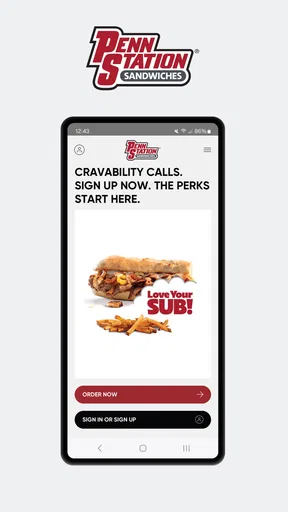
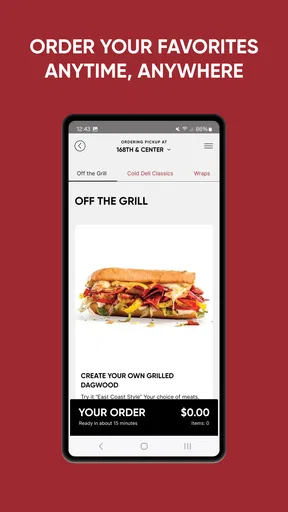
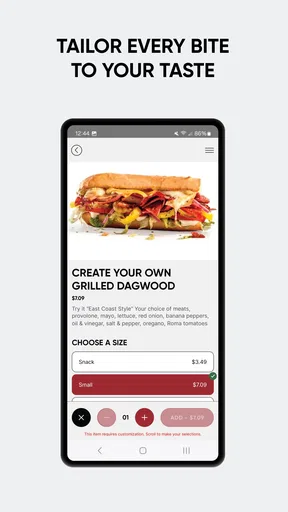
Our Review of Penn Station Sandwiches
 Analysis by Appyee
I like food-ordering apps best when they remove a small amount of friction without trying to become an entire lifestyle platform. Penn Station Sandwiches takes that focused approach. It is a free Food & Drink app from Penn Station East Coast Subs, built around ordering grilled subs for eating in, picking up, or having delivered. After spending time with it, I see it as a practical companion for people who already enjoy this restaurant and want a simpler way to plan an order.
The app is not trying to replace every restaurant app on your phone. Its value depends on whether Penn Station is already a realistic option where you live or work. If it is, the direct connection to the chain can feel more useful than searching through a broad delivery marketplace. If you are looking for a general restaurant finder, grocery ordering, meal planning, or a way to compare many local restaurants, this is the wrong tool.
What using Penn Station Sandwiches feels like
The first thing I noticed is how clearly the app’s purpose comes through. The store summary focuses on grilled subs and the three basic ways to get them: dine in, pick up, or delivery. That narrow purpose is a strength because I do not have to sort through unrelated restaurant categories before deciding what I want. I can approach it with a specific intention: find Penn Station, choose food, and decide how I will receive it.
That also sets a realistic expectation for speed. A focused restaurant app should feel quicker to understand than a large marketplace, but the actual experience still depends on the restaurant location, the order method, and the connection between the app and the store. I would not judge it solely by how quickly the first screen appears. The more important question is whether I can move from craving a grilled sub to a sensible order without repeatedly backing out, rechecking choices, or starting over.
For a normal lunch, the workflow makes the most sense when I decide the basics before opening the app. I choose whether I am picking up or requesting delivery, think about how many people I am ordering for, and then use the app to confirm the available choices. That small bit of preparation matters because it prevents the ordering process from becoming a browsing session when I am already hungry.
The app is also a better fit for repeat customers than for someone discovering Penn Station for the first time. A returning customer already knows the general style of food and can concentrate on the practical details of the order. A first-time user may need more time to understand the menu and decide what suits them, especially if they are comparing a grilled sub with other meal types.
Where the app saves time
The clearest time-saving use case is a planned pickup. Imagine leaving work with a short break and wanting food ready around the time you arrive. Using the app before walking out lets me separate the ordering decision from the handoff itself. I can place the order when I have a moment, travel to the restaurant, and avoid turning the counter visit into a second planning exercise.
That does not mean every order will be instant. A restaurant still has to prepare the food, and a delivery order adds travel time that no interface can remove. The app can make the request easier to submit, but it cannot guarantee that a busy kitchen will move at the pace of a quiet one. I appreciate this distinction because it prevents the common mistake of blaming an ordering app for every delay connected with food preparation or delivery.
For dine-in visits, the benefit is less dramatic. If I am already inside the restaurant, speaking with staff may be more natural than using a phone. The app becomes more useful when I want to decide before arriving or when I prefer to keep the ordering process on my own screen. It is a convenience layer, not a reason to avoid normal counter service.
How it handles a busy ordering moment
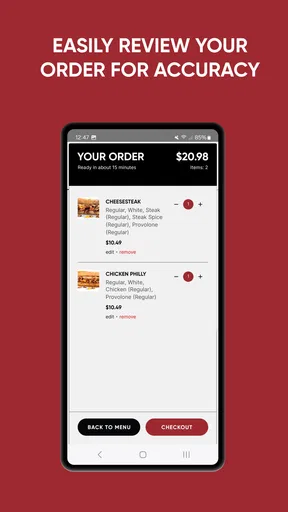
Heavy-use moments are where I would pay the closest attention. A lunch rush creates several possible points of friction: I may be choosing food while distracted, the restaurant may be receiving many orders, and delivery timing may be less predictable. In that situation, a clean ordering path matters more than decorative design. I want the app to help me review the order before committing, particularly when I am buying for several people.
My practical advice is to use pickup when timing is important and delivery when convenience matters more than precision. Pickup gives me a clearer sense of the final travel plan because I control the trip to the restaurant. Delivery is more comfortable when I cannot leave, but it introduces another moving part. That is not a flaw unique to this app; it is the basic trade-off between control and convenience.
Ordering for a group is another realistic stress test. A single-person order is easy to mentally verify. With several people, mistakes become more likely because preferences, quantities, and handoff details compete for attention. I would review the complete basket slowly before submitting rather than relying on memory. The app is most helpful when I treat it as a confirmation tool, not merely a button for sending the first choices that look appealing.
There is also a useful difference between planned and urgent use. If I am ordering well before a meal, I can check the details calmly and choose the right fulfillment method. If I am already late for a meeting, the app may still be convenient, but I should not assume that placing an order means the food will be ready immediately. The restaurant’s preparation time remains part of the experience.
Stability and recovering from interruptions
Reliability is not just about whether an app opens. For a food-ordering tool, I also care about what happens when I pause halfway through, lose focus, or change my mind about pickup versus delivery. A stable experience should make it easy to return to the task without confusion. I would be especially cautious with a complicated group order: if the session is interrupted, I would recheck the basket rather than assuming every selection survived exactly as intended.
That habit is sensible with any ordering app, but it matters more when the order contains several items or when I am moving between networks. I prefer to confirm the final choices, destination, and fulfillment method immediately before submitting. This is not glamorous advice, yet it is the kind that prevents an avoidable surprise at lunchtime.
The app’s focused scope helps recovery because there are fewer reasons to wander away from the main task. I am not managing a large collection of unrelated services. If I stop using it for a moment, I know the next step is still connected to the same restaurant order. The trade-off is that the app offers less value when I am not actively considering Penn Station food.
I would also keep the restaurant’s normal contact route in mind for unusual situations. If an order needs a special explanation, a substitution question, or clarification that does not fit comfortably into a standard ordering flow, direct communication can be better than repeatedly trying to force the request through an app. The app is strongest for ordinary orders with clear choices.
Performance on older or modest devices
Penn Station Sandwiches supports Android devices running version 7.0 or later, which gives it a broad reach across older hardware as well as newer phones. That compatibility is useful for people who keep a dependable older device instead of upgrading frequently. Still, operating-system support does not automatically tell me how every phone will feel in daily use. An older phone with limited free storage, an overloaded background, or a weak connection can make any ordering task feel slower.
Because this is a focused Food & Drink app rather than a game or a media-heavy service, I would expect its ordinary use to be less demanding than apps built around video, navigation, or constant content loading. I would not treat that as a measured claim about battery or memory consumption, but it is a reasonable expectation based on the job the app performs. For a short order session, resource demands should not be the main reason to reject it.
The more important device constraint is screen comfort. On a small phone, reviewing a multi-person order requires more scrolling and more attention. On a newer, larger display, the same task may feel easier simply because more information fits at once. I would avoid rushing through an order on a cracked or dim screen, particularly when checking quantities and the chosen delivery or pickup option.
Connection quality matters as much as device age. A phone can be perfectly capable while a poor signal makes the ordering process feel uncertain. If I am ordering from a basement, a crowded venue, or a moving vehicle, I would wait until I have a steadier connection. That is especially important before the final submission, when uncertainty about whether an order went through can lead to accidental duplicates.
Who should use it, and who should skip it
I would recommend this app to regular Penn Station customers, people who often plan pickup, and anyone who wants a direct way to arrange a grilled-sub meal without opening a broad delivery marketplace. It also makes sense for households where one person regularly handles lunch or dinner orders and wants a repeatable process for getting food from this particular chain.
It is less suitable for someone who wants to compare prices and menus across many restaurants in one place. A marketplace app may be better for that job because comparison is its central purpose. I would also skip this app if Penn Station is not a convenient nearby option for me. A polished ordering experience cannot compensate for a restaurant that is too far away or unavailable for the way I want to receive my food.
People with strict dietary requirements should approach any restaurant ordering app carefully. I would read the available item details closely and avoid assuming that a familiar sandwich automatically meets a particular allergy or dietary standard. When the consequences of an ingredient mistake are serious, I would use the clearest available communication with the restaurant rather than relying on an assumption made from a short menu description.
Likewise, this is not the app I would choose for elaborate meal planning. It is designed around ordering from Penn Station, not organizing a week of groceries or balancing recipes across several stores. Its narrowness is helpful when I know what restaurant I want, but limiting when my real goal is broader food management.
Useful habits for smoother orders
- Choose the fulfillment method before browsing deeply. Deciding between dine-in, pickup, and delivery early keeps the rest of the order aligned with the way I actually plan to eat.
- Review a group order as a separate step. I check quantities and individual choices after selecting everything, because adding items one at a time makes it easy to overlook a duplicate or omission.
- Use a stable connection for the final submission. If the screen appears uncertain, I verify the order status before trying again so I do not accidentally send the same request twice.
- Leave breathing room during busy periods. The app can organize the request, but it cannot remove kitchen workload or delivery travel, so I avoid planning a tight schedule around an optimistic assumption.
These habits reveal the app’s real role. It is not a magic shortcut that eliminates every variable in restaurant service. It is a focused control panel for making a Penn Station order more convenient. The better I understand that boundary, the more useful the app becomes.
Version, audience, and everyday fit
The current version is 3.35.5, and the app is rated for Everyone. That makes it approachable for ordinary household use rather than positioning it as a specialist tool. Penn Station East Coast Subs is the developer, so the app’s identity is closely tied to the restaurant brand instead of being a general-purpose ordering service.
It has a 4.5 average from over eight hundred ratings and more than one hundred reviews, with over fifty thousand installs. Those figures suggest that the app has found a meaningful audience, while still leaving room for individual experiences to vary by device, location, and ordering situation. I see the numbers as a sign of established interest, not a guarantee that every order will be flawless.
It was released on April 28, 2025, and is free to install. The absence of an upfront app charge makes it easy to try, especially if I am already a Penn Station customer. The real value question is therefore not whether the download costs anything, but whether ordering through the app is more convenient than my usual counter visit or preferred marketplace.
My performance verdict
After weighing speed expectations, busy-period behavior, recovery, and device constraints, I see Penn Station Sandwiches as a sensible, specialized app rather than an essential download for everyone. Its focused purpose should make ordinary ordering easier to understand, and its support for pickup and delivery gives it practical value beyond simply displaying the restaurant name.
Its limitations are equally clear. It cannot control kitchen workload, delivery conditions, connection quality, or the suitability of Penn Station for my location. It is also not the best option when I want broad restaurant comparison, detailed meal planning, or unusual order communication. Those are important boundaries, and ignoring them would create unrealistic expectations.
My recommendation is straightforward: if I already buy Penn Station subs and often want pickup or delivery, I would keep this free app available and use it for planned orders. I would take a moment to verify the final basket, allow extra time during busy meals, and use direct communication for questions that do not fit a standard order. For everyone else, especially people looking for a universal food marketplace, another app will probably serve the broader need better.
In short, Penn Station Sandwiches succeeds by staying close to one job: helping me arrange food from Penn Station East Coast Subs. I would not install it for variety, discovery, or advanced food management. I would install it for a dependable shortcut to a familiar grilled-sub order, provided the restaurant is already part of my routine.
Verdict
Strengths of Penn Station Sandwiches
- Quick ordering makes it convenient for busy commuters.
- Menu offers familiar sandwich options for different tastes.
- Portions are generally satisfying for a quick meal.
- Useful choice when you need food near the station.
- Simple interface makes browsing the menu straightforward.
Limitations of Penn Station Sandwiches
- Food quality may vary depending on the location and preparation time.
- Prices can feel high compared with nearby fast-food alternatives.
- Peak-hour queues may reduce the convenience of ordering.
- Customization options may be limited for specific dietary needs.
- Some menu items may be unavailable during busy periods.
Similar Picks in This Category
View All
Rappi: Food Delivery, Grocery
Rappi, Inc - Delivery3.5

McDonald’s: Cupons e Delivery
Arcos Dorados4.3

Swiggy: Food Instamart Dineout
Swiggy4.7

Blinkit: Groceries & more
Blinkit4.8

foodpanda: food & groceries
Foodpanda GmbH a subsidiary of Delivery Hero SE4.0

Zomato: Food Delivery & Dining
Zomato4.7
Frequently Asked Questions
What is Penn Station Sandwiches, and what can I order through the app?
Penn Station Sandwiches is the official mobile ordering app for browsing the restaurant’s menu and placing an order for pickup, where available. From the app, you can explore hot grilled subs, cold sandwiches, wraps, fresh-cut fries, salads, cookies, drinks, and other menu items. Available products, combinations, prices, and locations may vary depending on the selected restaurant.
Can I customize my sandwich or choose specific ingredients?
Yes, the app generally allows you to customize eligible sandwiches and meals before adding them to your order. Depending on the item and location, you may be able to select toppings, remove ingredients, adjust portions, choose bread or preparation preferences, and add extras. Review the final item summary carefully, because customization options and additional charges can differ between restaurants.
Does Penn Station Sandwiches offer delivery, or is it only for pickup?
The app is primarily designed to help customers place orders for pickup at participating Penn Station locations. Delivery availability may depend on your area, the individual restaurant, and any third-party delivery services connected to that location. After entering or selecting a restaurant, check the available ordering methods before completing your purchase, since not every store supports delivery.
How do I pay for an order in the Penn Station Sandwiches app?
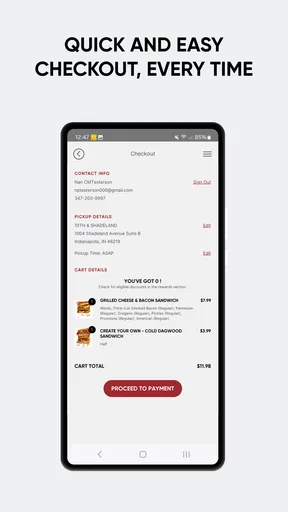
Payment methods can vary according to the app version, restaurant, and ordering channel, but customers may typically pay with an accepted credit or debit card and, in some cases, other supported digital payment options. Before submitting an order, confirm the total cost, taxes, fees, selected location, and pickup details. Keep your confirmation available when collecting the food.
Is the Penn Station Sandwiches app free to download, and does it require an account?
The app is generally free to download, although you still pay for the food, applicable taxes, and any service or delivery fees associated with an order. Some features may work without creating an account, while saving favorite locations, storing order details, viewing order history, or receiving rewards may require registration. Check the app’s current permissions and privacy information before signing up.
